One platform for every truck, docket and invoice.
FreGo brings FTL and PTL operations, proof of delivery, billing and E-Way Bill compliance into one system, so your team stops chasing paper and closes the books faster.
A day in your operation, made simple
A short look at how FreGo handles the daily work, from the first indent to the paid invoice.
One docket, start to finish
Follow a consignment through FreGo, from the first indent to the paid invoice. Every step feeds the next.
Indent
Raise the truck requirement and track it until a vehicle is placed.
Docket
Book the docket with the E-Way Bill, contract freight and GST worked out.
Trip
Assign the vehicle and driver and generate the truck hire challan.
POD
Capture proof of delivery, audit it and process it in bulk.
Invoice
Bill the delivered docket, track collection and reconcile.
Everything your operation runs on
Operations, delivery proof, billing, compliance, fleet and reporting in a single system.
FTL and PTL, end to end
Indents, pickup sheets, manifests, trips, delivery sheets, godown delivery and crossing challans on one platform.
POD that gets you paid sooner
Capture digitally, audit before billing and update in bulk. Late PODs show up the moment they are late.
Explore POD →Invoices out as soon as the POD is in
Approval, submission, collection, credit notes and bank reconciliation. Vendor payments with TDS worked out.
Explore billing →E-Way Bill and E-Invoice, built in
Fetch, Part B, extend, cancel and reassign E-Way Bills. Generate e-invoice IRNs from the same system.
Explore compliance →Run your own trucks
Trips, drivers and settlement, plus tyres, batteries, maintenance and spare parts.
Explore fleet →See the whole operation at a glance
Six dashboards across FTL, PTL, billing, payments, profitability and fleet maintenance, plus 30+ reports.
Built for the people who run the daily work
Live visibility, tracking, indents and reports in one interface. Screenshots show sample data.
See FreGo with your own operation
Book a live demo and we will walk you through FreGo on your own operation.
The FreGo Product Suite
FreGo App, FreGo Comply, FreGo Track, FreGo Connect, FreGo Mobile — plus POD, Fleet and Analytics modules — working together as one platform.
- FTL: Indent → Docket → Trip → Delivery (POD)
- PTL: Booking to Crossing Challan Update (12 steps)
- Digital POD, POD Audit & Bulk POD
- Fleet Operations & Fleet Maintenance
- Customer Billing + Vendor Payments
- Bank Reconciliation & TDS
- Check assigned E-Way Bills
- Part B Updation & Cancellation
- Assign EWB to a different transporter
- Auto Extension before expiry
- E-Invoice to IRP — IRN generated from FreGo
- Digitally signed QR code in PDF
- Credit Note IRN with auto knock-off
- GPS hardware device integration
- SIM-based tracking (no hardware needed)
- Live Map Dashboard for all vehicles
- Real-time location updates
- WhatsApp delivery alerts to consignees
- Route deviation alerts
- WhatsApp delivery status alerts
- POD notification to consignees
- REST API for all modules
- Webhooks for real-time event push
- API beyond PAYG tier
- iOS & Android native app
- POD capture with photos
- Digital consignee signature
- Delivery timestamp & geo-location
- Real-time GPS tracking
- Works offline with auto-sync
- Digital POD management
- POD Audit
- Bulk POD management
- POD triggers customer billing
- Trip Management
- Driver Management
- Driver Settlement
- Tyre Management
- Battery Management
- Maintenance Management
- Spare Parts Inventory Management
- 6 advanced dashboards: FTL, PTL, Billing, Payment, Profitability, Fleet Maintenance
- 30+ reports across all modules
- Branch-wise performance comparison
- Bank reconciliation variance reports
- Export to Excel / PDF
Real screens.
Real operations.
Screens from the product, shown with sample data.
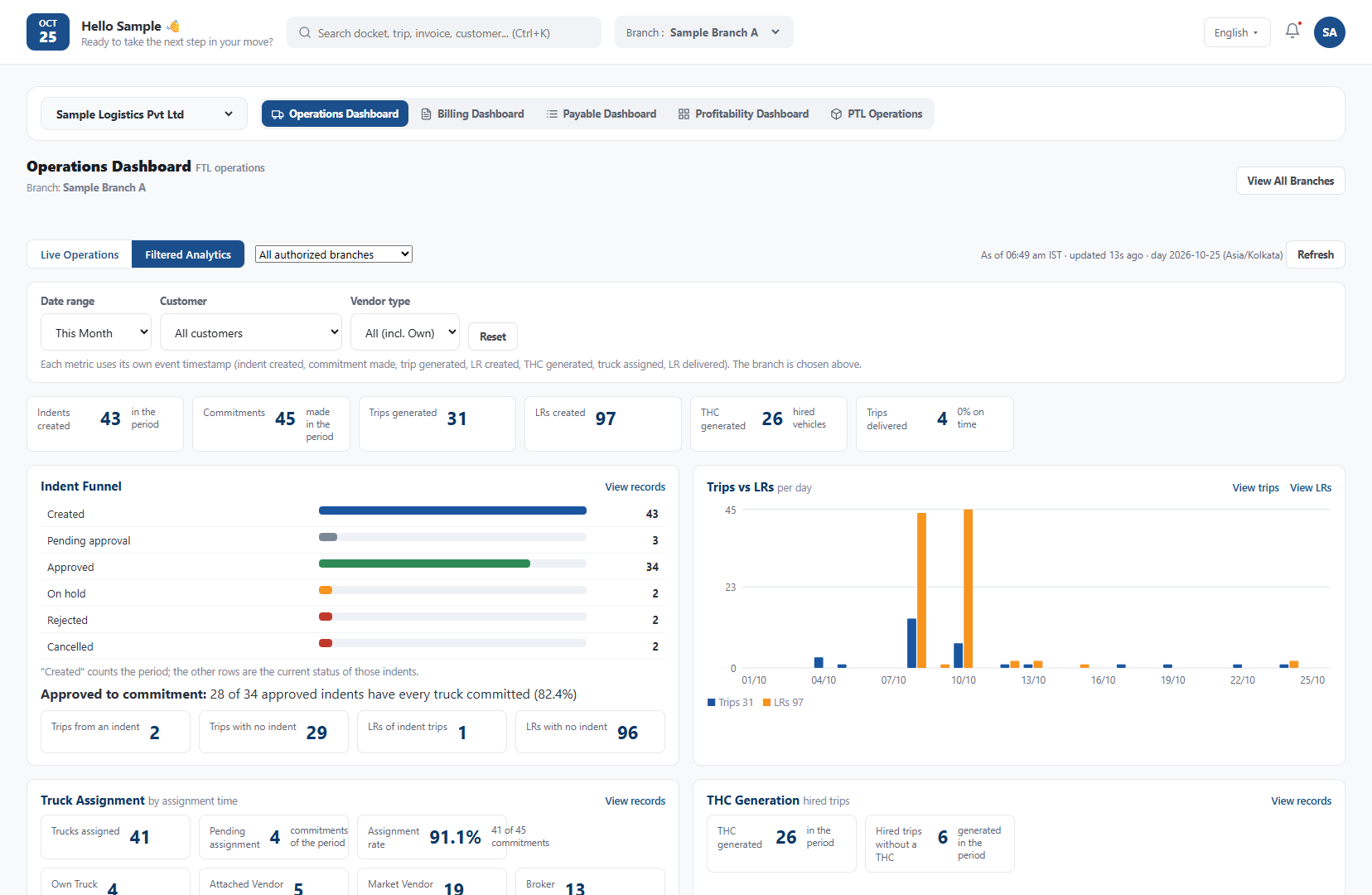
Live operations dashboard — docket status, alerts and E-Way Bill counters in one view.
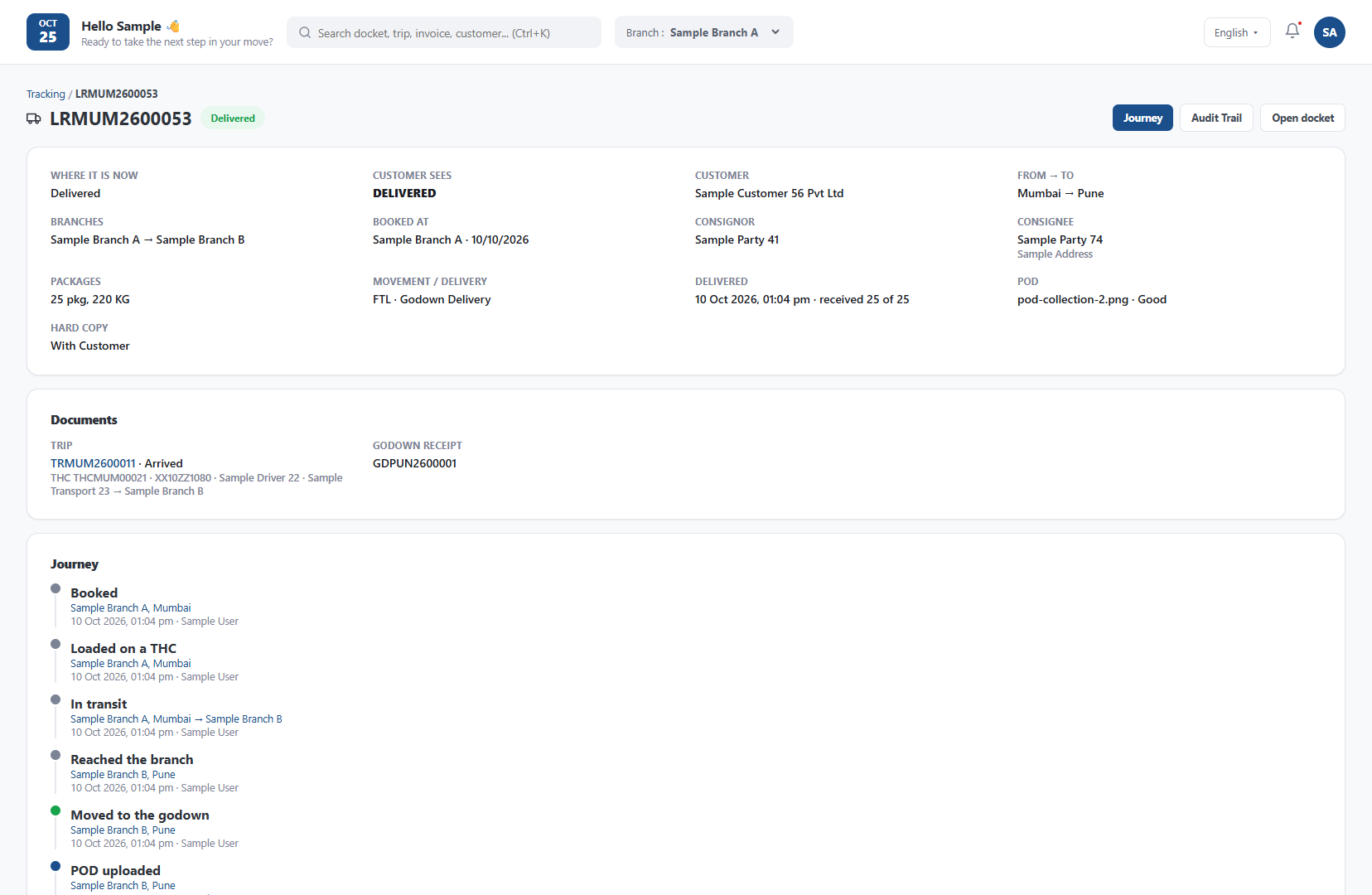
Trip and docket tracking — follow any consignment from indent to delivery.
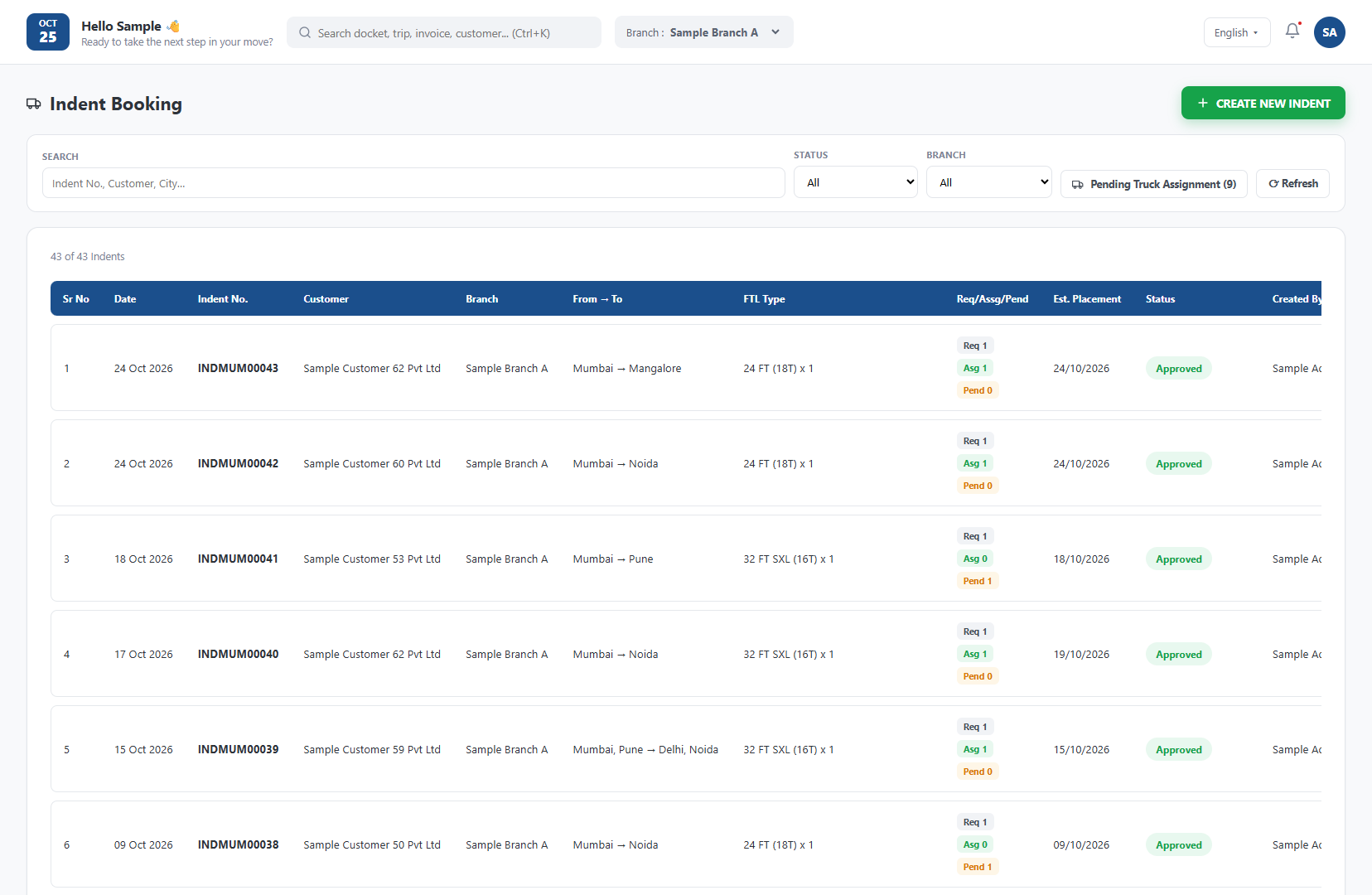
Indent dashboard — every indent with trucks required, assigned and pending.
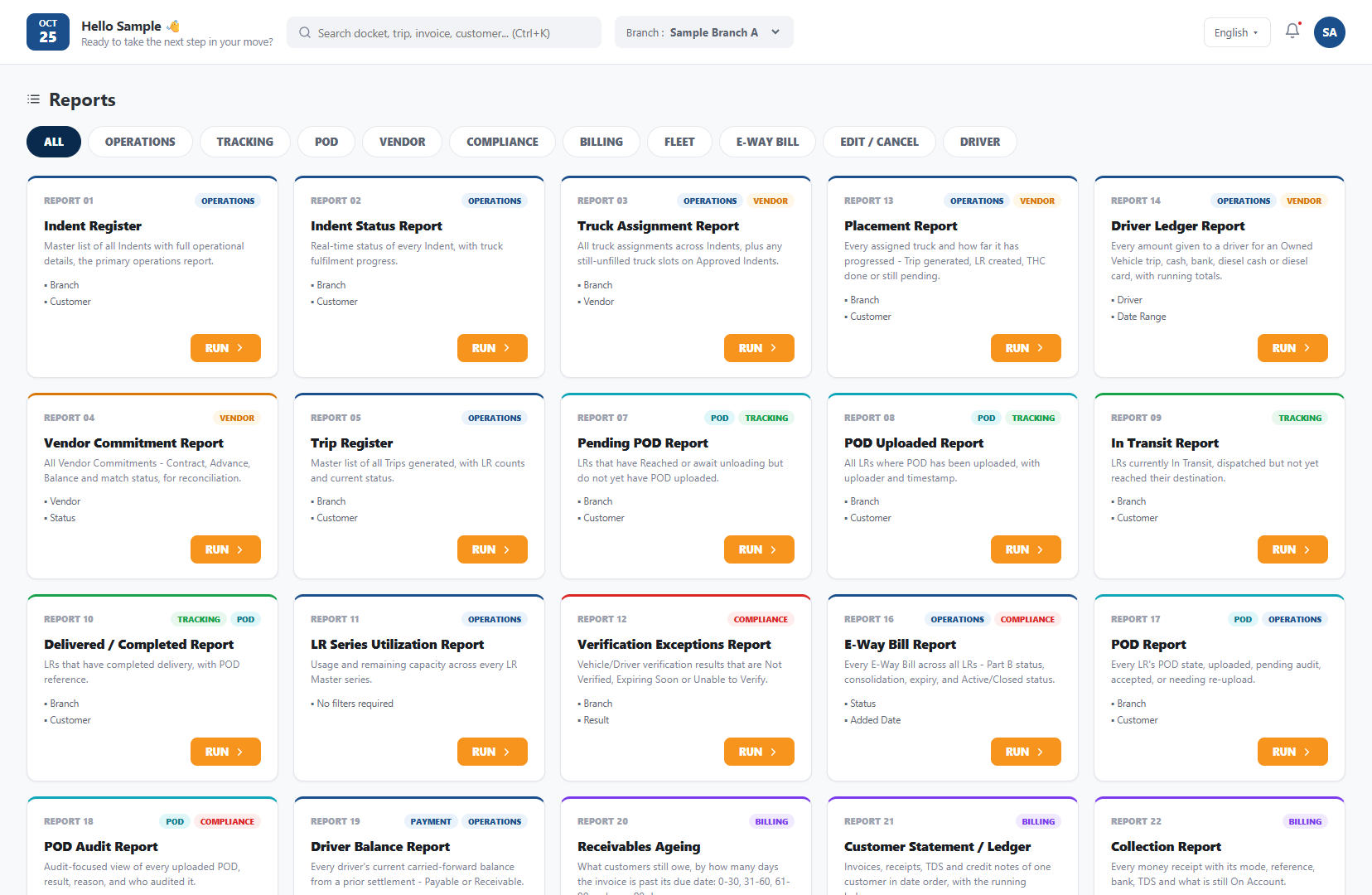
Reports library — operational reports, ready to run and export.
See every product in action.
Book a live demo tailored to your operations.
Every Step. Every Process.
FTL, PTL, POD, E-Way Bill, Fleet, Billing, Vendor Payment and Analytics — full workflow detail.
Full Truckload — from Indent to Delivery
Run every full-truckload movement on one screen. A customer indent becomes a docket, the docket becomes a trip, and the trip ends with a captured POD that automatically starts billing and vendor payment — with less re-typing between teams.
- Indent raised and tracked until a vehicle is placed
- E-Way Bill validated when the docket is created
- Own or hired vehicle assigned with driver
- Part B of the E-Way Bill updated with the vehicle
- POD triggers customer invoice and vendor balance
Indent
The customer or branch raises a vehicle requirement with route, material, weight, vehicle type and loading date. The indent is tracked until a truck is placed against it.
Vehicle requirementDocket
A docket (LR) is created against the indent. The E-Way Bill is validated with NIC and the consignor, consignee, goods and freight details fill in automatically.
EWB validatedTrip
An own or hired vehicle and a driver are assigned. Part B of the E-Way Bill is updated with the vehicle number, and the trip is followed until it arrives.
Part B updatedDelivery (POD)
Delivery is confirmed and the POD is captured. The POD starts the customer invoice and releases the vendor balance.
Auto invoiceIndent management
Capture customer requirements and convert each indent into a docket without re-entry.
EWB auto-validation
Docket details are pulled from the E-Way Bill, so errors are caught at booking, not at the highway check-post.
Vehicle & driver assignment
Assign own or market vehicles and drivers to the trip and see their status in one place.
Trip visibility
Follow every trip from loading to arrival, with live location through FreGo Track.
Hired-vehicle payments
Advance and balance to the vehicle owner flow from the same trip, with TDS applied.
POD-driven billing
The moment the POD is in, the invoice is ready — shortening your billing cycle.
Faster cash cycle
Billing starts the moment POD is captured instead of waiting for paperwork.
Fewer compliance errors
E-Way Bill is checked and updated at the right step of the trip.
One version of the truth
Operations, billing and finance all work from the same trip record.
Part Truckload — Booking to Crossing Challan
The complete part-load network on one platform: booking, pickup, hub manifests, linehaul, delivery sheets, godown delivery and crossing to partner transporters. Twelve connected steps, with E-Way Bill and POD handled where they belong.
- Booking with E-Way Bill validation
- Pickup with Part B update
- Manifest and THC for linehaul vehicles
- Delivery sheets with POD capture
- Godown delivery and crossing challans
Booking
Create the LR/docket with consignor, consignee, packages, weight and charges. The E-Way Bill is validated as the docket is booked.
EWBPickup
A pickup run is created and a pickup vehicle is assigned. Part B is updated for the pickup vehicle.
Part BPickup Update
Confirm what was actually collected — packages and weight — and record any mismatch right at the pickup point.
Manifest
Dockets are grouped by destination into a hub-to-hub manifest ready for loading.
THC
A Truck Hire Challan is generated for the linehaul vehicle with hire details, so the vehicle owner payment is traceable.
Vehicle hireTrip Arrival
Arrival at the destination hub is recorded and the manifest is checked against what was received.
Trip Update
The trip is closed and exceptions such as shortage or damage are noted against the dockets.
Delivery Sheet
Dockets for local delivery are grouped into a delivery run with a vehicle and delivery executive.
Part BDelivery Sheet Update (POD)
Delivery status and POD are updated for every docket on the sheet — which starts customer billing.
Auto invoiceGodown Delivery
Consignees who collect from the godown are handed their goods and their POD is recorded.
Crossing Challan Generation
For goods handed to a partner transporter, a crossing challan is generated and the E-Way Bill is assigned to the other transporter.
Assign EWBCrossing Challan Update (POD)
The crossing POD from the partner is updated, so every docket is closed end to end.
Hub & branch network
Operate any number of branches and hubs under one account.
Manifest & THC
Move dockets between hubs and keep vehicle hire charges tied to each manifest.
Crossing to partners
Hand over freight to another transporter and keep the paper trail and E-Way Bill in order.
POD at every delivery
Delivery sheet, godown and crossing deliveries each end in a recorded POD.
Every docket traceable
From booking to final POD, each status change is recorded.
No manual handovers
Each step feeds the next — manifests, challans and billing.
Compliance built in
E-Way Bill actions happen at the exact steps that need them.
Digital POD, Audit & Bulk Management
Proof of delivery is what turns a delivery into revenue. FreGo captures it digitally, lets your team audit it, and lets you process hundreds of PODs at once — so missing PODs are spotted early.
- Digital POD capture with photos and signature
- Audit PODs before billing
- Process many PODs in one go
- Pending and received POD visibility
Capture
The driver or delivery executive captures the POD in FreGo Mobile — photos, consignee signature and delivery time and location.
Digital PODReceive
Physical or scanned PODs received at the branch are recorded against their dockets.
Branch receiptAudit
The back office checks each POD for completeness and correctness, and approves or sends it back.
POD AuditBill
Audited PODs release customer billing and vendor balance payments.
Auto triggerDigital POD management
Every POD stored against its docket and searchable — no more hunting through files.
POD Audit
A review step that makes sure only clean, confirmed deliveries move to billing.
Bulk POD management
Upload and update PODs for many dockets at once, instead of docket by docket.
Quicker billing
Missing PODs are visible immediately, so they get chased early.
Fewer disputes
A verified POD is your evidence when a customer questions a delivery.
Less data entry
Bulk updates save hours for branch teams.
Every E-Way Bill action, inside FreGo
Direct integration with the NIC portal means your team can do these actions without logging in to the portal separately. Each action sits at the exact step of the FTL or PTL flow where it is needed.
- No separate NIC login
- Actions available at the right workflow step
- Auto extension before expiry
- Cancellation and re-assignment from FreGo
Check Assigned E-Way Bills
See every E-Way Bill assigned to your GSTIN and pick the ones to work on, without opening the NIC portal.
Validate E-Way Bill
Confirm the E-Way Bill details before a docket is created.
Create Docket via EWB
Pull consignor, consignee and goods details straight from the E-Way Bill to build the docket.
Part B Updation
Update the vehicle number when the vehicle changes or the consignment moves.
Cancellation
Cancel an E-Way Bill from inside FreGo when a consignment is not going ahead.
Assign to a Different Transporter
Reassign the E-Way Bill to another transporter during crossing or handover.
Auto Extension
Extend the validity before it expires to reduce the risk of an expired E-Way Bill on a consignment in transit.
Stay compliant
Validity and Part B are managed before problems appear on the road.
Save time
Fewer portals to jump between.
Full visibility
See what is expiring today and what needs action.
Manage your own fleet — trips, drivers and settlement
For transporters who run their own vehicles. Plan trips, keep every driver's records and allocations in order, and settle driver advances and expenses accurately when the trip closes.
- Trip planning and assignment
- Driver records and allocations
- Trip expenses against each trip
- Driver settlement on trip close
Trip Management
Plan and assign trips to your own vehicles and follow them to completion.
TripsDriver Management
Maintain driver details and see which driver is allocated to which vehicle and trip.
DriversTrip Expenses
Record advances and on-road expenses against the trip as they happen.
ExpensesDriver Settlement
When the trip closes, advances and expenses are reconciled and the driver is settled.
SettlementTrip Management
One place to plan, assign and track every trip of your own fleet.
Driver Management
Driver details and trip history kept together.
Driver Settlement
Accurate advance-versus-expense settlement without spreadsheets.
Know your fleet
See which vehicles and drivers are on which trip.
Cleaner accounts
Settlements tie back to the exact trips.
Faster closure
Trips close and settle without chasing paperwork.
Tyres, batteries, servicing and spares
Keep every vehicle road-ready and know exactly what each one costs to maintain. Tyres, batteries, servicing and spare parts stock are all tracked against the vehicle they belong to.
- Tyre life tracked by vehicle and position
- Battery tracking and replacements
- Service and repair records per vehicle
- Spare parts stock and usage
Issue or Due Date
A repair is reported or a service falls due for a vehicle.
TriggerJob Card
A maintenance job is opened for the vehicle with the work to be done.
MaintenanceParts Issued
Spare parts, tyres or a battery are issued from stock against the job.
InventoryCost Recorded
Parts and service cost are recorded against the vehicle for cost-per-vehicle visibility.
Vehicle costTyre Management
Track every tyre by vehicle and position through its whole life.
Battery Management
Know which battery is on which vehicle and when it is due for replacement.
Maintenance Management
Keep service and repair history for every vehicle and see the upkeep cost.
Spare Parts Inventory
Manage workshop stock, issues and consumption.
Control cost per vehicle
See where maintenance money is going.
Fewer breakdowns
Planned servicing beats on-road failures.
Stock visibility
Know what spares you have before you need them.
Customer Billing & E-Invoice
From POD confirmation to E-Invoice IRN on the IRP — largely automated, with much less manual entry.
Invoice Generation
Invoices are generated automatically from delivered dockets using your rate card, with GST applied.
AutoApproval
The invoice goes through your approval before it is released to the customer.
ApprovalSubmission
Approved invoices are submitted to the customer by email or WhatsApp link.
CustomerCollection
Payments received are recorded against invoices and outstanding is updated.
ReceiptsCredit Note
Adjustments and corrections are issued as credit notes, with IRN where applicable.
IRNBank Reconciliation
Bank statements are matched with receipts so the books close cleanly.
Auto-matchPOD Confirmation & Billing Trigger
The moment a delivery POD is captured in FreGo Mobile, the billing module triggers automatically — no manual handover between operations and finance.
Auto-Trigger on PODRate Calculation & Invoice Draft
FreGo applies the pre-configured rate card — freight charge, ODA surcharge, chargeable weight logic, fuel surcharge — and generates the invoice draft instantly.
GST Computation & GSTR-1 Prep
CGST/SGST for intra-state, IGST for inter-state — auto-applied. GSTR-1 data populated in real time. No month-end scramble.
GST CompliantE-Invoice Push to IRP & IRN Generation
FreGo pushes invoice data to the IRP. The IRP validates and returns the IRN and digitally signed QR code. No separate NIC portal login is needed.
E-Invoice IRPIRN GeneratedPDF with QR Code & IRN Embed
Professional invoice PDF auto-generated with IRN embedded, QR code printed, and digital signature included. Ready for customer delivery.
Customer Delivery & Portal Access
Invoice emailed automatically, shareable via WhatsApp link, and available in the customer self-serve portal for download and payment tracking.
Credit Note & IRN Knock-Off
Credit note registered on IRP, knocked off against original invoice. GSTR-1 data stays in step with less manual entry.
Auto IRN Knock-Off- Direct IRP integration — no manual NIC login required
- IRN generated in real-time on invoice creation
- Digitally signed QR code embedded in PDF automatically
- Supports B2B, Export, SEZ, and Deemed Export
- Credit Note IRN with auto knock-off on IRP portal
- Invoice approval and submission workflow
- Collection tracking with bank reconciliation
- Auto freight invoice triggered on POD confirmation
- Smart rate engine: ODA, chargeable weight, fuel surcharge
- CGST/SGST/IGST auto-applied based on consignment route
- Invoice series configurable per branch
- Bulk invoice generation for consolidated billing
- GSTR-1 auto-populated — no manual data entry
- Customer email delivery with PDF attachment
- WhatsApp invoice sharing link (FreGo Connect)
- Customer self-serve portal for invoice access
- Payment tracking against invoice
- Outstanding & aging report per customer
Vendor Payment Process Management
Complete vendor payment lifecycle — advance on trip start to final settlement on POD, TDS 194C automated.
Advance Payment
Advance is released to the vehicle owner on the trip, with TDS applied automatically.
TDSBalance Payment
On POD, the balance after advance, TDS and deductions is calculated and paid.
Auto calcDebit Note
Shortage, damage or other charges are raised as a debit note against the vendor bill.
Bank Reconciliation
Payments are matched against the bank statement.
Auto-matchTDS
TDS is tracked per vendor so quarterly filing data is always ready.
26QVendor Onboarding & Rate Finalization
Vendor master with PAN, GST, bank details. Rate card per route, vehicle type, and load. TDS category auto-set by PAN type.
Trip Assignment & Advance Release
On trip creation, advance released to vendor. TDS 194C automatically deducted on advance. Advance entry recorded in vendor ledger.
TDS 194C Auto-DeductedPOD Confirmation
Driver submits POD via FreGo Mobile — photos, digital signature, timestamp. Operations confirms delivery. Payment eligibility auto-triggered.
Balance Calculation
Total Freight − Advance − TDS 194C − GST RCM = Balance Payable. Full ledger entry created. Finance approves for disbursement.
GST RCM AppliedPayment Disbursement & Reconciliation
Balance transferred via bank. Bank statement auto-reconciled against vendor ledger. 26Q data updated for quarterly TDS filing.
26Q Auto-Updated- Advance + balance two-step vendor payment workflow
- Debit note against vendor bills
- Configurable advance percentage per trip type
- Auto-hold balance until POD confirmed
- Finance approval workflow before disbursement
- Bulk payment processing for multiple vendors
- TDS 194C: 1% (Individual/HUF) or 2% (Company) auto-applied
- Annual threshold tracking per vendor PAN
- GST RCM auto-calculated for unregistered vendors
- 26Q data auto-populated for quarterly filing
- TDS certificate (Form 16A) generation
- Full vendor ledger with every transaction
- Vendor statement generation (monthly/custom period)
- Outstanding balance report per vendor
- Bank reconciliation with auto-match
- Export to Excel/PDF for audit
Advanced Analytics Dashboards
Six purpose-built dashboards plus 30+ reports across every module — exportable to Excel and PDF.
FTL Dashboard
Indents, dockets, trips and deliveries at a glance.
- Open indents and placements
- Trips in transit and delayed
- Pending PODs
PTL Dashboard
Bookings, manifests, trips and delivery performance.
- Bookings and pickups
- Hub-wise manifests
- Delivery and crossing status
Billing Dashboard
Invoicing, collections and outstanding.
- Invoiced vs collected
- Outstanding and ageing
- Credit notes
Payment Dashboard
Vendor advances, balances and TDS.
- Advance and balance due
- Debit notes
- TDS deducted
Profitability Dashboard
Margin by customer, route and trip.
- Revenue vs cost
- Margin by customer
- Route-wise profit
Fleet Maintenance Dashboard
Tyre, battery, maintenance and spares cost.
- Cost per vehicle
- Tyre and battery life
- Spares stock
Connected to Everything
FreGo is built open — connect to any system, device or channel.
Ready to automate your operations?
Book a live demo and see every module in detail tailored to your setup.
Building the logistics
infrastructure India deserves.
FreGo Logitech Pvt. Ltd. — founded January 2026, backed by Idmaa Private Limited, on a mission to fully digitize Indian transport operations.
Born from first-hand experience.
FreGo was founded in January 2026 by people from logistics and technology backgrounds — backed by Idmaa Private Limited, a Mumbai-based FMCG distribution company with experience in supply chain, logistics and B2B distribution.
The founding team identified a critical gap: Many Indian transporters still run daily operations on WhatsApp, phone calls and paper, and many software tools are not built around India's compliance needs.
FreGo was built ground-up from day one — treating Indian operational reality as the design specification. Built around Indian compliance from the start.
To make every Indian transporter — from a 5-truck operator to a 500-truck network — operate with greater efficiency, visibility and compliance.
A future where Indian logistics is fully digital, fully compliant, and fully competitive — powered by technology built in India, for India.
FreGo Timeline
Backed by Idmaa Private Limited
FreGo is backed by Idmaa Private Limited, a Mumbai-based distribution and supply chain company.
Learn more about Idmaa at idmaa.in.
Join us on the journey.
Be among the first transporters to run their operations on FreGo.
The Team Behind FreGo
The people building and supporting FreGo.
All focused on FreGo.
Want to work with us? Get in touch.
We're always looking for great people who share our passion for Indian logistics technology.
Build India's Logistics Future With Us
We're a small, ambitious team solving a massive problem. If you love logistics, technology, and making things that matter — this is where you belong.
Join when it matters most. Your work goes into a live product, not a backlog queue.
No heavy approval chains. If it's the right call, we build it — fast. Ownership is a default, not a reward.
Many Indian transport offices still run on WhatsApp and paper. We're fixing that — and there's a lot to fix.
Current Openings
We're not actively hiring at the moment, but we're always open to hearing from people who want to build Indian logistics tech. Send us an open application below.
We hire for the person, not just the position. If you're excited about Indian logistics tech and want to build something real — reach out. We'll find where you fit.
How We Work
We prototype in days, not sprints. Real user feedback beats internal debate every time.
Understanding Indian logistics operations is not optional — it's what makes great product decisions possible.
Ideas matter more than titles. The best argument wins, regardless of who's making it.
We've sat in a transporter's office and watched how they work. Every feature we build solves a real, observed pain.
Ready to join the FreGo team?
Drop us your CV and a note on what excites you about logistics tech.
Let's talk about
your operations.
Demo request, pricing query, custom plan — we're here.
Contact FreGo
Plot No. 370, Mogul Lane, Mumbai – 400016
Mira Road, Thane – 401107, Maharashtra
CIN U62011MH2026PTC465494
Privacy Policy
How FreGo Logitech Pvt. Ltd. collects and uses personal data through www.frego.io. Last updated: 27 October 2026.
1. Who we are
This website is operated by FreGo Logitech Pvt. Ltd. ("FreGo", "we", "us"), registered office at 33A-6, Laxmi Shantinagar CHS Ltd, Sec. 4, Mira Road, Thane – 401107, Maharashtra, India, and head office at Unit No. 113, 1st Floor, Mahim United Industrial Premises, Plot No. 370, Mogul Lane, Mumbai – 400016, India (CIN U62011MH2026PTC465494). For the personal data described in this policy, FreGo decides why and how the data is used (a "Data Fiduciary" under India's Digital Personal Data Protection Act, 2023, the "DPDP Act").
Contact for privacy questions, requests and complaints: junaid@frego.io or +91 77383 82261. Please put "Privacy request" in the subject line.
2. What this policy covers
This policy covers the public website at www.frego.io. It does not cover the FreGo application (the software our customers log in to, including its sign-up page at the address shown there). Data that customers enter into the application is processed on their behalf under their agreement with us. The application's sign-up page may have its own notice, which applies there.
3. What personal data we collect and why
| Where | Data we collect | Why we use it |
|---|---|---|
| Contact form | Name, company name, mobile number (required); email address, area of interest and message (optional) | To reply to your enquiry, arrange a demo and prepare a quote. |
| Careers application form | Name, email, phone, role of interest, your CV and an optional cover letter (these files may contain your education, work history and other details you choose to include) | To consider you for a role at FreGo and to contact you about it. |
| Emails, calls or messages you send us | The details you give us in them | To respond and keep a record of our conversation. |
| Website hosting logs | IP address, browser and device type, pages requested, date and time | To keep the website running, secure it and investigate misuse. These logs are kept by our hosting provider. |
We ask only for the details we need for these purposes. Optional fields are marked as optional. We do not collect payment card or bank details, Aadhaar, PAN or GSTIN through this website, and we do not collect precise location, biometric data or data from children.
The assistant chat window on the website works inside your browser. What you type into it is not sent to us or to any other server.
4. Our basis for using your data: your consent
We use the data you give us in the contact and careers forms only after you tick the consent box next to the form. You can withdraw that consent at any time as easily as you gave it, by emailing junaid@frego.io. Withdrawing consent does not affect what we did before you withdrew, and we may keep data we are required by law to keep. If you withdraw consent for an application or enquiry, we will not be able to continue considering it.
5. Who we share data with
We do not sell your personal data and we do not share it with advertisers. We use these service providers to run the website and handle your messages:
- Google Cloud (Google LLC and its affiliates): hosts the website and the service that receives your form submissions, and provides the email service through which we receive them.
Inside FreGo, only people who need your data to deal with your enquiry or application can see it. We may disclose data if the law, a court or a government authority requires us to.
6. Transfers outside India
Our website and form service run on Google Cloud servers located in the United States, and our email is handled by Google. Your data may therefore be processed outside India. We do not transfer data to any country that the Government of India has restricted for this purpose.
7. How long we keep data
- Enquiries and related emails: while we are dealing with your enquiry and, if it does not lead to a customer relationship, for up to 24 months after our last contact, then we delete them.
- Career applications: up to 12 months after the application, unless you ask us to delete them sooner or we hire you.
- Website hosting logs: kept by the hosting provider for a short period, typically around 30 days.
If you become a customer, a different retention period under your agreement applies to your customer data.
8. Your rights
Under the DPDP Act you have the right to:
- get a summary of the personal data we hold about you and how we use it, and the names of those we have shared it with;
- ask us to correct, complete or update your data;
- ask us to erase your data when it is no longer needed for the purpose it was given;
- withdraw your consent at any time;
- have your grievance dealt with by us, and nominate another person to exercise these rights if you die or become unable to.
To use any of these rights, email junaid@frego.io with "Privacy request" in the subject. We may ask you to confirm your identity first. We will reply as quickly as we reasonably can and within the time limits set by law.
9. Complaints
If you are unhappy with how we handled your data, please write to us first at junaid@frego.io. If we have not resolved it, you may complain to the Data Protection Board of India once it is operating and accepting complaints under the DPDP Act.
10. Security
We use reasonable security measures to protect data: the website uses an encrypted (HTTPS) connection, form submissions are sent to us over HTTPS, we limit access to the mailbox that receives them, and the credentials used to send them are kept in a protected secrets service and not in the website's code. No internet service is completely secure. If a breach affecting your personal data occurs, we will inform you and the authorities as the law requires.
11. Children
This website is meant for businesses. It is not directed at people under 18 and we do not knowingly collect their personal data. If you think a child has sent us data, please tell us and we will delete it.
12. Cookies and similar technologies
This website does not use cookies or similar technologies for analytics, advertising or tracking. See our Cookie Policy.
13. Links to other websites
The website links to other sites, such as LinkedIn, Instagram, X, idmaa.in and the FreGo application. They have their own privacy practices and we are not responsible for them.
14. Changes to this policy
If we change this policy, we will post the new version here with a new date. If a change affects how we use data you have already given us, we will ask for your consent again where the law requires it.
Terms of Use
The terms for using the FreGo website, www.frego.io. Last updated: 27 October 2026.
1. About these terms
These terms apply to your use of the website www.frego.io, operated by FreGo Logitech Pvt. Ltd., registered office at 33A-6, Laxmi Shantinagar CHS Ltd, Sec. 4, Mira Road, Thane – 401107, Maharashtra, India, and head office at Unit No. 113, 1st Floor, Mahim United Industrial Premises, Plot No. 370, Mogul Lane, Mumbai – 400016, India (CIN U62011MH2026PTC465494; email junaid@frego.io, phone +91 77383 82261). By using the website you agree to them. If you do not agree, please do not use it.
Use of the FreGo software itself (the application) is governed by a separate agreement or order form between FreGo and the customer. If anything in these terms conflicts with that agreement, the agreement prevails for the software.
2. Information on this website
- The website describes our products and plans. It is general information and not a binding offer. A contract is formed only when both sides accept a written quotation, order form or subscription agreement.
- Prices shown are in Indian rupees and exclude GST and other applicable taxes unless stated. Starting prices and plan descriptions are indicative; the final price and scope are confirmed in your quotation. One-time setup and other charges may apply.
- Screenshots show the product with sample data. Names, numbers and records in them are not real customers. Features, screens and plans may change.
- We try to keep the information accurate and up to date, but we do not promise that it is complete or error-free.
3. Compliance information is not advice
Content about the GST system, E-Way Bill, E-Invoice, TDS and similar matters is general information only. It is not legal, tax or accounting advice. Rules change. Please check the current rules on the official portals or with a qualified professional before relying on it. FreGo is an independent company. It is not part of, endorsed by, or affiliated with the Government of India, the National Informatics Centre (NIC), the Goods and Services Tax Network (GSTN) or any other authority. Names of government systems and third-party products are used only to describe what our software works with. They belong to their owners.
4. Acceptable use
You agree not to: use the website unlawfully; try to gain unauthorised access to it or its servers; introduce malware; overload or disrupt it; copy it by automated means (scraping) in a way that harms it; or submit information that is false, unlawful or that belongs to someone else without their permission.
5. What you send us
If you send us information through a form or by email, you confirm that it is accurate and that you have the right to share it. We use it as described in our Privacy Policy.
6. Intellectual property
The website, its design, text, screenshots, logo and software are owned by FreGo or its licensors and are protected by copyright, trademark and other laws. You may view the website and share a link to it. You may not copy, modify, distribute or use our content or logo for commercial purposes without our written permission. "FreGo" and the FreGo logo are used by FreGo Logitech Pvt. Ltd. Other names and logos belong to their owners.
7. Third-party links
Links to other websites are provided for convenience. We do not control them, are not responsible for their content or practices, and a link is not an endorsement.
8. No warranty
The website is provided "as is" and "as available". To the fullest extent the law allows, we do not give any warranty that it will be uninterrupted, error-free or free of harmful components.
9. Limit on our liability
To the fullest extent the law allows, FreGo is not liable for indirect or consequential loss, or for loss of profit, data or business, arising from your use of the website or reliance on its content. Nothing in these terms limits liability that cannot be limited by law, such as liability for fraud or for death or personal injury caused by negligence.
10. Governing law and disputes
These terms are governed by the laws of India. The courts at Mumbai have exclusive jurisdiction over any dispute about them, subject to any rights you have under law that cannot be waived.
11. Changes
We may change these terms from time to time. The version on this page, with its date, is the current one. Continued use of the website after a change means you accept it.
12. Contact
Questions about these terms: junaid@frego.io.
Cookie Policy
What this website stores on your device. Last updated: 27 October 2026.
1. The short version
The FreGo website does not use cookies, and it does not use analytics, advertising or tracking tools. It does not store information on your device, so we do not show a cookie banner.
2. What cookies are
Cookies are small files a website saves on your device. Websites use them to remember settings, keep you signed in, measure visits or show ads. Similar technologies include local storage and tracking pixels.
3. What this website does
- No cookies are set by www.frego.io.
- No analytics (such as Google Analytics), advertising pixels, social media plugins or session-recording tools are loaded.
- The fonts and images on the website are served from our own website, not from outside companies.
- Our hosting provider, Google Cloud, keeps server logs (see the Privacy Policy). These logs are on our servers, not stored on your device.
4. Other sites you may reach from here
- The FreGo application (a separate website that you may be directed to when you register) is a separate website. It may use cookies or browser storage that are necessary to sign in and keep your session safe. Check the notice on that site.
- Social media and other links (LinkedIn, Instagram, X, idmaa.in) are run by other companies, and they may set their own cookies when you visit them.
- If we add a video to this website in future, it will load from YouTube only after you click play. YouTube may then set cookies.
5. Your choices
You can block or delete cookies in your browser settings at any time. If we ever add analytics or advertising tools to this website, we will tell you here and ask for your consent first.
6. Contact
Questions: junaid@frego.io.
Refund and Cancellation Policy
How cancellations and refunds work for FreGo plans and services. Last updated: 27 October 2026.
1. When this applies
This policy applies to subscriptions, add-ons and setup services bought from FreGo Logitech Pvt. Ltd. The website itself does not take payments. Charges are agreed in a written quotation or order form and paid against our invoice. If your signed order form says something different from this page, the order form applies.
2. How we charge
- Plans and add-ons are billed for the term stated in your quotation, usually yearly and in advance.
- Setup and onboarding are one-time charges stated in your quotation.
- Each plan includes a number of dockets, users and branches for each month, as stated in your quotation. A docket is one consignment (LR) created. Edits and cancelled dockets are not counted. Unused dockets do not carry over to the next month.
- If you go over, we do not stop the service. Extra dockets, users and branches are charged at the rates stated in your quotation. These charges are added to your next invoice.
- All prices exclude GST unless stated.
3. Cancelling
- You can stop your plan from renewing by writing to junaid@frego.io at least 30 days before the renewal date. The service then continues until the end of the term you have paid for.
- You can cancel before onboarding work has started. After that, see the setup fee rule below.
4. Refunds
- Subscription and add-on fees: not refundable for a term that has already started, except as set out below.
- Setup fee: refunded in full if you cancel before we start onboarding work. Not refundable once onboarding work has started.
- Charged in error: if we charge you twice or the wrong amount, we will refund or credit the difference once it is confirmed.
- If we end the service early without a cause on your side, or cannot provide a material part of the service you paid for after you give us written notice and a reasonable time to fix it: we will refund the part of the prepaid fee that covers the period you did not receive the service.
5. How refunds are paid
Approved refunds are paid to the account or payment method you paid from, within 10 business days after we approve them. Tax is refunded only where a credit note can be issued under the law.
6. How to ask
Write to junaid@frego.io with your company name, invoice number and reason, within 15 days of the invoice date for billing errors. We will reply within 7 business days.
7. Your legal rights
Nothing in this policy takes away any right you have under Indian law that cannot be excluded by agreement.
Accessibility Statement
Our approach to making the FreGo website usable by everyone. Last updated: 27 October 2026.
Our aim
We want everyone, including people who use screen readers, keyboards only, voice control or screen magnifiers, to be able to use this website. We aim to follow the Web Content Accessibility Guidelines (WCAG) 2.2 at level AA.
What we have done
- The whole website can be used with a keyboard, with a visible focus indicator and a "skip to main content" link.
- Form fields have labels, required fields are marked, and error messages are announced to screen readers.
- Text colours are chosen to meet the WCAG AA contrast ratio.
- Images have text alternatives, and the animated overview on the home page can be paused and does not start by itself if your device is set to reduce motion.
- Pages use headings and landmarks to give a clear structure.
Known limits
- The product screenshots are pictures of the software, so small text inside them is not readable by screen readers. The text next to each screenshot describes what it shows.
- We have tested the site ourselves with automated checks and keyboard use. It has not been checked by an independent accessibility auditor.
Tell us about a problem
If you cannot use part of this website, email junaid@frego.io or call +91 77383 82261. Tell us the page and the problem. We will try to fix it or give you the information in another way.